Clipboard Buttons3.0.0
Publisher Description
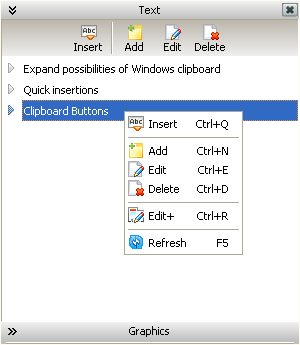
Program Clipboard Buttons will organize management of the favorite user text or graphic data. Expanding possibilities Windows clipboard with two external buttons. Added in title bars all open windows. The first button executes a command to "Copy", the second executes a command to "Paste". Through these buttons, and also, through hot keyboard combinations corresponding to them, it is possible to get fast access to repository favorite text and graphic inserts.
Using these buttons it is possible to increase productivity and to simplify work on the computer. Do not search and do not type for the same texts - simply take them from Clipboard Buttons. While it is necessary to reproduce operatively the text or a picture, you put the cursor there where wish to insert the text or a picture, and press button "Paste" in title bar a current window. Then choose the necessary insert and through double click place it in a proper place. Extremely simply, quickly and conveniently.
The similar way makes addition of new text or graphic inserts. Having chosen the block of the actual text information in any window. You select this block using the mouse and press button "Copy" in title bar a current window. As a result, the selected text, after editing or at once, appears in repository.
Clipboard Buttons will be useful to people working with text or graphic information. And also, all who wishes to have fast access to stably demanded information. Once created and periodically again actual: addresses, names, avatars, dates, citations, greetings, smiles, various templates (text, HTML, XML) and other similar.
About Clipboard Buttons
This Office Suites & Tools program is available in English, French, German, Russian, Spanish. It was last updated on 02 November, 2026. Clipboard Buttons is compatible with the following operating systems: Other, Windows.
The company that develops Clipboard Buttons is JobManSoft. The latest version released by its developer is 3.0.0. This version was rated by 8 users of our site and has an average rating of 2.1.
The download we have available for Clipboard Buttons has a file size of 1.0 MB. Just click the green Download button above to start the downloading process. The program is listed on our website since 2011-09-14 and was downloaded 533 times. We have already checked if the download link is safe, however for your own protection we recommend that you scan the downloaded software with your antivirus. Your antivirus may detect the Clipboard Buttons as malware if the download link is broken.
How to install Clipboard Buttons on your Windows device:
- Click on the Download button on our website. This will start the download from the website of the developer.
- Once the Clipboard Buttons is downloaded click on it to start the setup process (assuming you are on a desktop computer).
- When the installation is finished you should be able to see and run the program.
Program Details
System requirements
Download information
Pricing
Version History
version 3.0.0
posted on 2011-09-14
Possibility of selective show of external buttons is added.Button "Copy" has gained additional layout. There was a possibility of creation of a screenshot of the selected window.For graphics records, the text remark, a mode of preview and possibility of saving in a file is added.
